
GOLDEN, Colorado – Golden Software, a leading developer of mapping, plotting, and visualization software, has improved numerous features in its Grapher scientific graphing package to provide greater ease of use to both long-time and first-time users. In addition, Grapher file menus and command ribbons have been simplified to enhance overall discoverability and user friendliness.
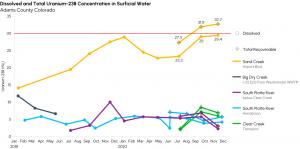
Grapher users can now more clearly demonstrate multifaceted data insights with enhanced visualization functionality, as in this review of uranium concentrations in surface water sources in Adams County, Colorado.
“In the new release of Grapher, we continued to build on our recent usability survey with the goal of streamlining the interface and functionality so that users become more productive,” said Santiago Vivas, Grapher Product Manager. “New users will also find Grapher is faster and easier to learn.”
Grapher enables users to make better decisions by visualizing and communicating complex data sets in ways that simply can’t be accomplished with spreadsheets. Used extensively by scientists and engineers in environmental services and consulting, climate research, exploration, and academic pursuits, Grapher offers deeper insights into diverse data sets, including chemical, physical, geologic, and geospatial data, through 80 different 2D and 3D plotting types. Grapher is often used to plot data captured by a variety of chemical and physical sensors in the field.
The newest release of Grapher, which is downloadable now to all users with active maintenance or subscription agreements, includes these enhancements:
Move and Copy Pages – No more overloaded Project files! Managing and organizing Projects just got a lot easier. Users can now quickly move pages into, or out of, Projects to create one file with many pages or a series of Projects each with one page.
Improved Gradient Properties – When a user chooses to display a Gradient instead of a Pattern, the selected properties of the gradient, and not the pattern, are retained. Inactive patterns are not displayed once the new gradient is chosen.
Custom Histogram Binning – An improvement on the existing Automatic Binning feature, users can now manually tweak one or more of the value bins generated in Grapher with just a few clicks.
Image Cropping – Users have long been able to import images into Grapher, but they previously had to use a third-party package to crop them. Now users can crop the image within Grapher to create the best fit and appearance.
Add Plot Icon – It was not clear that users could add plots to graphs or what types of plots could be added. However, users can add plots simply and easily by clicking on a green Plus icon onscreen.
Save All – For users who have been working on multiple open pages and Project files, Grapher now allows all changes in all files to be saved with just one click on the Save All command.
Text Editor – Editing the text in a graph is easier than ever thanks to an obvious new ‘Text Editor’ button on the command ribbon.
Eliminated ‘Import’ Buttons – Grapher previously had too many buttons with the word Import on them. These have all been replaced with Open File commands. All the same file types are still supported in Grapher but with a simpler way to open them.
Enhanced Quick Access Menu – Important option and property commands such as Save, Open, and Export have been added to the Quick Access Menu in the form of a gear icon so users can easily find often repeated functions without searching in sub menus.
Overall, the Grapher file menus and command ribbons are now similar to, and consistent with, interface elements in Golden Software’s popular Surfer gridding, mapping and 3D visualization package. For customers who use both packages, Golden is making the transition between them as seamless as possible.
Grapher Beta Available
As is the tradition, Golden Software has released a Beta version of Grapher simultaneously with the new version to give customers a chance to try out new features and provide feedback while they are still in development. Users may find the Beta version by clicking File | Online from within Grapher.
Key Beta functions in this version include:
Several other upgrades are in the works for Grapher and will be unveiled with a new release next year.
About Golden Software
Founded in 1983, Golden Software is a leading developer of scientific visualization software at a great value. Its customer base includes over 100,000 professionals involved in environmental services, engineering consulting, resource exploration and extraction, applied science, business, education, and government in nearly 190 countries and territories. Golden Software offers two products: Surfer® for gridding, mapping & 3D visualization system and Grapher™ for 2D and 3D graphing. Golden Software offers its clients personalized support invested in their success.
For additional information, visit www.GoldenSoftware.com or call 1-303-279-1021.
